






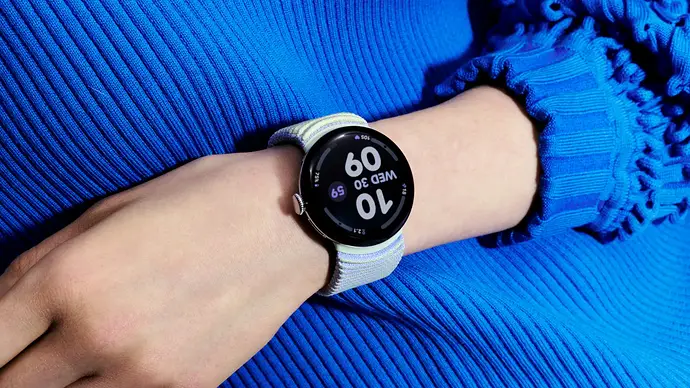
On March 3, 2026, Google rolled out its spring Pixel Drop, and theExpress Pay on Pixel Watch is its most anticipated new feature. For the first time, owners of Pixel Watch 2, 3, and 4 can pay for their purchases by simply holding their wrist over an NFC terminal, without needing to launch Google Wallet beforehand.
This is an evolution that may seem minor on paper, but it significantly changes the daily experience. Until now, each payment required manually opening the app or going through an additional authentication step. Google has clearly listened to its users, who have been demanding this fluidity for years.
How Express Pay Works
TheExpress Pay relies on advanced motion detection algorithms integrated into the watch. When the user turns their wrist towards a payment terminal, the Pixel Watch identifies the intention to pay and automatically initiates the transaction via NFC, without requiring interaction with the screen.
Google offers two configuration modes when activating the feature. The first mode, "Tap to pay and transit," covers both in-store purchases and public transport validation. The second mode, "Transit only," is limited to public transport, which may suit users who prefer to keep manual confirmation for their purchases.
The feature requires explicit opt-in: it is not enabled by default. Google also specifies that the watch must be unlocked for Express Pay to work, which is an essential safeguard against unwanted transactions.
Activation: Steps to set up Express Pay
Open the Pixel Watch app on your Android phone
Go to the Google Wallet section
Tap on your profile picture, then on "Wallet settings"
Enable Express Pay and choose the desired mode (general payment or transit only)
Google Catches Up to Apple Watch on This Specific Point
The comparison with the Apple Watch is inevitable. Apple has offered an express mode on its Watch for several years, allowing the use of a transport or payment card without waking or unlocking the device. Google, on the other hand, has made a different choice regarding security: Express Pay on Pixel Watch requires the watch to be unlocked, which reduces the risk of a transaction being initiated without the user's knowledge.
| Feature | Apple Watch Express Mode | Pixel Watch Express Pay |
|---|---|---|
| Unlock Required | No | Yes |
| Mandatory opt-in | No (active by default on some cards) | Yes |
| Transit mode only | Yes | Yes |
| General payment mode | Yes | Yes |
| Compatible models | Apple Watch Series 4 and later | Pixel Watch 2, 3, 4 |
This positioning reflects Google's security philosophy: speed is a goal, but not at the expense of user control. "It's not an open NFC system where anyone can access your information," Android Authority specifies in its analysis of the feature. (It's not an open NFC system where anyone can access your information.)
A Pixel Drop Rich in Security Features
Express Pay is not the only new feature in the March 2026 Pixel Drop. Google took advantage of this update to significantly enhance the security of its Pixel Watch ecosystem. The watch now receives disconnection notifications: if the user moves away from their paired Pixel phone via Bluetooth, an alert is sent to the watch. This feature is disabled by default and compatible with Pixel 8 and later models.
In the same vein, an option for automatic phone locking comes into play as soon as the Pixel Watch leaves the smartphone's Bluetooth range. Unlocking is then done via the usual method (PIN code, fingerprint). Both of these features are available on Pixel Watch 2, 3, and 4, paired with a Pixel 8 or higher.
The Pixel Watch 3 and Pixel Watch 4 also benefit from a new feature called "Trusted Places," which speeds up identity verification when the watch is near the phone. This option allows, among other things, to disable Find My Device more easily, simply by entering a PIN code, without going through a full authentication procedure. However, it is reserved for owners of a Pixel 8 Pro or a more recent model.
Find Hub, Earthquake Alerts, and New Regions for Satellite SOS
The Pixel Drop also includes the Find Hub on Wear OSapp, which allows you to locate connected objects and lost devices directly from your wrist, without going through your phone. This new feature is for Pixel Watch 2, 3, and 4.
Google has also added an autonomous seismic alert function to these three models. The watch can receive real-time notifications in case of seismic activity nearby, even without being connected to an Android phone, provided there is a Wi-Fi or LTE connection. This functionality is currently limited to certain regions of the United States.
The Pixel Watch 3, which until now did not have the one-handed gestures introduced on the Pixel Watch 4, receives this backport with this update. As for the Pixel Watch 4, its Pixel Watch Satellite SOS service extends to new geographical areas, including certain regions of Europe, Canada, Puerto Rico, Alaska, and Hawaii.
Deployment and Compatibility
The update is being distributed over-the-air (OTA) since March 3, 2026. The build numbers are “CP1A.260305.014.W2” for Bluetooth and Wi-Fi models, and “CP1A.260305.014.W4” for 4G LTE models. Google specifies that the deployment primarily affects Bluetooth/Wi-Fi models; 4G LTE versions will have to wait a little longer to receive the update.
To manually check for the update's availability, go to Wear OS settings, then “System”, “About”, and then “System updates”. Users can speed up the update's appearance by tapping the watch icon multiple times on this screen, a trick that continues to work on Pixel Watch 3 and 4.
This March 2026 Pixel Drop confirms Google's strategy: to progressively enrich its smartwatches with substantial software updates, rather than concentrating all new features on annual hardware cycles. For users of Pixel Watch 2 and subsequent generations, Express Pay undoubtedly represents the most concrete feature of the batch. It finally brings the contactless payment experience on Android closer to what Apple Watch users have known for several years, with a level of security that Google claims to be superior.

No Comment! Be the first one.