





Since early April 2026, more and more Galaxy Watch owners are seeing Google Play Services climb to the top of energy consumption, sometimes with over 60% of battery used on a single charge. This Galaxy Watch battery bug Google Play Services appeared after recent updates and affects several generations of Samsung smartwatches. The goal for users is simple: to get a watch that lasts the day, without having to disable all the 'smart' features.
What we know about the bug in June 2026
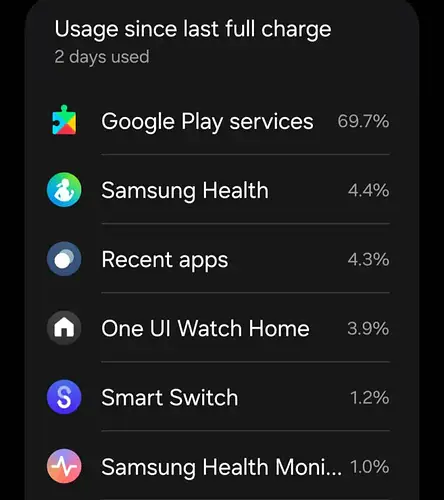
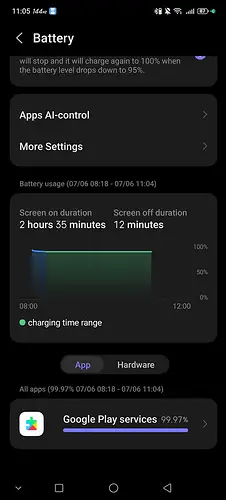
The alert really escalated in the spring of 2026, when users of Galaxy Watch 6, 7, 8, and even Ultra models began sharing screenshots showing aberrant consumption by Google Play Services. Some reports mention 30%, 60%, or even nearly 100% of the battery attributed to this single system component since the last charge. These figures are far from normal behavior, where Play Services should only represent a small fraction of daily usage.
The article published by Android Authority on June 10, 2026, already compiled several testimonials of this type and highlighted that the problem does not affect a single generation of watch, but a range of Samsung Wear OS models. On their side, other specialized media and support forums describe a bug that appeared after software updates in early 2026, with no detailed official explanation or complete troubleshooting guide provided by Samsung or Google. At this stage, there is nothing to say with certainty whether the core of the problem lies in a specific version of Wear OS, an update to Play Services, or a server-side change.
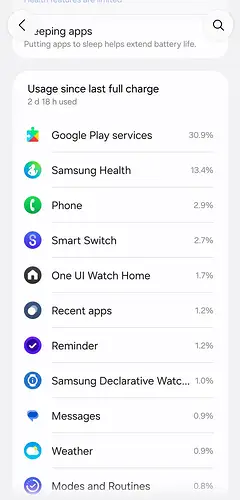
Why Google Play Services can ruin battery life
On a Galaxy Watch, Google Play Services is not a 'simple app' that can be uninstalled: it is a key layer that manages, among other things, communication with Google servers, certain notifications, data synchronizations, and sometimes location. If this layer gets stuck in the background, for example due to an incomplete update or a synchronization that never finishes, it can cause permanent CPU and network usage, which drains the battery.
Several discussions on Wear OS support forums and within the Galaxy Watch community describe scenarios where, after a security or Play Services update, the watch starts consuming much more than before, even though usage habits have not changed. In some cases, the drain is maximal right after a series of app downloads or updates via the Play Store, suggesting that Play Services insists on completing background tasks, even when the user is no longer interacting with the watch.
First steps to take directly on the watch
Before considering a full reset, there are several simple actions to try, directly from the Galaxy Watch, which are regularly recommended by Google and the community.
Force app updates and unblock downloads
In some cases, the abnormal behavior stems from a stuck update. It is recommended to open the Google Play Store on the watch, go to app management, and manually initiate the update for all pending apps, then let the watch work for a few minutes before restarting it.Clear Google Play Services cache
Technical guides then recommend clearing the cache, and if necessary, the data, for Google Play Services, via the watch's settings and the system app list. This often helps correct a corrupted internal state that maintains permanent background activity.Restart the watch after operations
A full restart of the Galaxy Watch, or even the associated smartphone, helps to establish a clean Bluetooth connection and restart system services in a coherent order. Many users report at least a stabilization of the drain after these basic steps, even if it is not a universal remedy.
Adjusting permissions to limit damage
In cases where Google Play Services continues to appear very high in battery stats, Wear OS community experts recommend reviewing the most sensitive permissions, particularly location. The idea is to reduce the number of unnecessary requests that force Play Services to poll the position or network far more often than necessary.
The most frequent advice is to set non-essential apps to 'location permission only while in use' and to ensure that only essential components, such as health services or the device's search function, retain permanent access. Some testimonials also report a decrease in drain by replacing Google Assistant with Bixby or temporarily disabling voice assistants, which rely heavily on Google services to respond to commands. This type of adjustment can save precious hours of battery life without completely sacrificing the smartwatch experience.
When to consider a reset, and with what limitations
When all previous approaches fail, Google and Samsung support teams eventually suggest a factory reset of the Galaxy Watch as a last resort. The goal is to start with a clean system, eliminating configuration bugs or corrupted data that would keep Play Services in an unstable state.
On forums, some owners explain that they have regained what they consider 'normal' battery life after a reset, with a return to several days of mixed use on the latest models. Others, however, note a more modest improvement, or even a return of the bug after a few days, which fuels the idea that part of the problem could stem from server-side changes or subsequent updates. Before proceeding, it is therefore crucial to back up the watch via the Galaxy Wearable app on your smartphone, in order to restore health data and certain settings, and then gradually reconfigure applications to quickly identify those that might restart the drain.
What this bug says about Samsung's dependence on Google
Beyond the immediate battery problem, this episode highlights Samsung's growing dependence on Google for the operation of its Wear OS watches. When Google Play Services malfunctions, it's not just a 'Google app' that fails, but the entire Galaxy Watch experience that degrades, even though the watch is still sold and promoted under the Samsung brand.
Several analyses point out that this shared architecture needs to be better acknowledged publicly by both partners, especially in terms of crisis communication. To date, users have primarily had to rely on community feedback and a few specialized articles, due to a lack of detailed communication on the origin of the bug, the timeline for a fix, or the official list of affected models. If this type of problem recurs, the issue of control over the software stack, between One UI Watch and Google services, will become central to the long-term reliability perception of Galaxy Watches.
While waiting for a fix, how to organize yourself daily
As of June 2026, there is still no officially identified and documented fix for this Google Play Services-related drain bug on Galaxy Watch. However, user experience suggests that combining several best practices can significantly limit the impact on daily life: keeping the watch and apps updated, regularly clearing the cache and data of Play Services, adjusting location permissions, and monitoring apps that trigger the most synchronizations.
For the most affected users, a reset accompanied by progressive reconfiguration remains the most radical but also the most cumbersome solution, while awaiting a more transparent fix from Samsung and Google. In parallel, following the news on specialized sites and user forums allows for quickly spotting the arrival of a new system update, or a server-side change, that would finally stabilize the situation across all models. In practice, it is this mix of vigilance, fine-tuning, and community pressure that will offer the best chance of recovering consistent battery life on your Galaxy Watch.

No comments! Be the first one.